

Walgreens Passport Photo


- 3-Minute
- Expert
- 800K+
- Passport Photos
- Verification
- Photos Approved
Walgreens Passport Photo—Service Information
- SERVICE DETAILS
Does Walgreens do passport photos in 2026?
Yes, Walgreens offers in-store passport photos for $16.99, which includes two printed photos and a free digital copy via email upon request. Store staff take the photo and check that it meets current U.S. passport requirements, making the process quick and straightforward.
The service includes automatic compliance checks for size, background, and framing, helping reduce the risk of rejection when submitting your application.
How much does Walgreens charge for passport photos?
A set of two 2×2″ passport photos at Walgreens costs $16.99. The price also includes a digital copy, which can be emailed to you at no extra charge. If you’d prefer to receive the file on a USB drive, an additional fee may apply.
Do I need an appointment? What are Walgreens operating hours?
No appointment is required—simply visit the Photo Center during business hours (typically 9:00 AM – 9:00 PM) and ask an employee to take your passport photo.
Note: Some Walgreens locations are open 24 hours, although passport photo services may have limited overnight availability depending on staffing.
Does Walgreens do digital passport photos?
Yes, a digital copy is included with a set of two passport photos. Just ask the store associate to email it to you.
Does Walgreens print passport photos?
Walgreens doesn’t print passport photos from personal files—they only provide passport photos taken in-store by their staff. If you already have a passport photo arranged on a 4×6 inch template, though, you can simply order it as a regular 4×6 print through Walgreens Photo.
How to print it:
1Upload your 4×6 template to Walgreens Photo.
2Choose a standard 4×6 print size.
3Select pickup or delivery.
4Confirm your order.
4Print and pick up your photos.
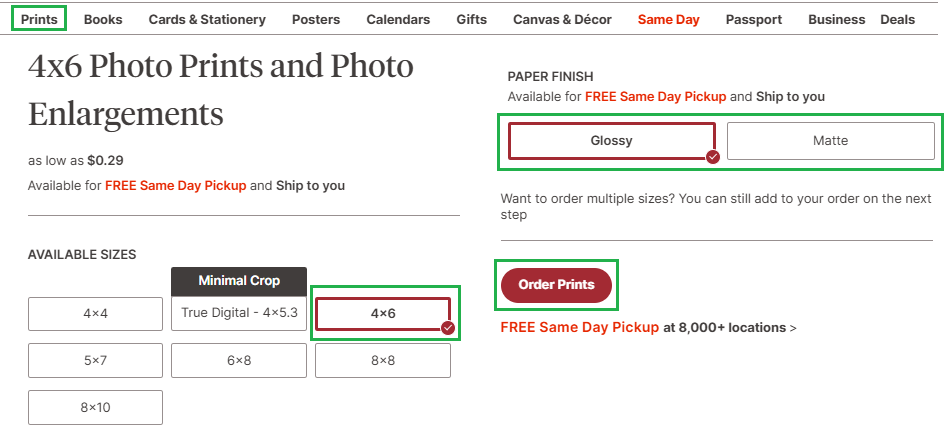
See how to order a 4×6 print of a passport photo template at Walgreens Photo. What size is a Walgreens passport photo?
Walgreens offers 2×2 in (51×51 mm) photos, the official U.S. standard size. Photos meet U.S. passport requirements, including a white background and right head size.
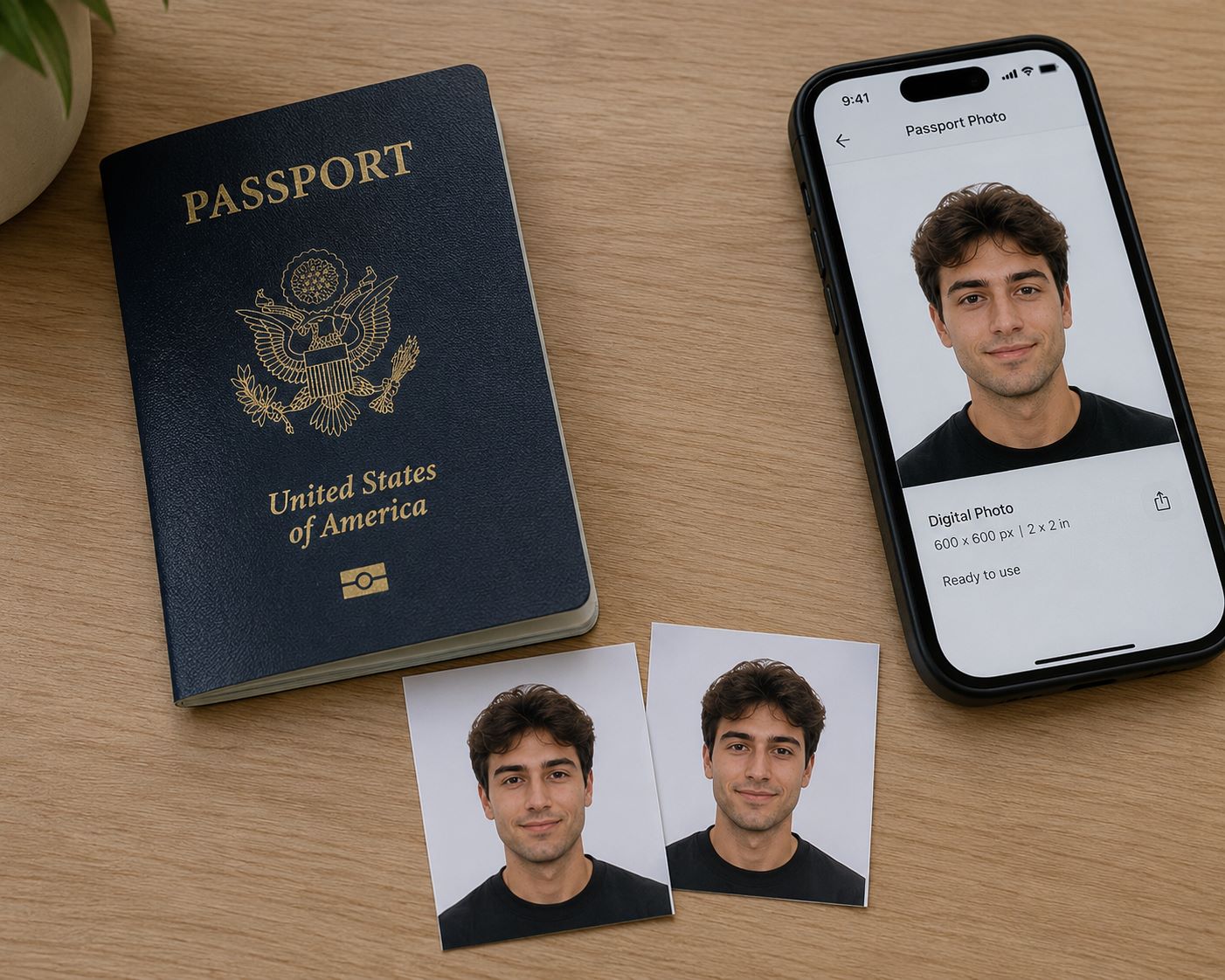
See example of Walgreens passport photo Does Walgreens take baby and children passport photos?
Yes, Walgreens offers passport photos for everyone, from newborns to adults. Since services can vary by location, it’s a good idea to call your local store before visiting. The staff can let you know if they recommend bringing anything to help with the photo, such as a white blanket or a car seat for your baby.
- IN-STORE PROCESS
How Walgreens passport photo service works
If you visit a Walgreens store for passport photos, the entire process is completed in-store by a Walgreens associate using a passport photo system designed to help meet U.S. passport requirements.
Step 1: In-store photo capture
At the photo counter, a Walgreens associate will take your passport photo using equipment intended for passport photography. During the photo session, attention is paid to:
- correct head size and positioning
- a plain white background
- proper lighting
- a neutral facial expression
These details are important because U.S. passport photos must meet specific requirements established by the U.S. Department of State.
Step 2: Compliance review
After the photo is taken, it is reviewed using Walgreens’ passport photo system to check whether it meets official requirements. The review typically includes factors such as:
- head size and position within the accepted range
- neutral facial expression
- correct background color
- absence of shadows, glare, or other issues
If a problem is detected, the photo can usually be retaken immediately.
Step 3: Printing in the correct format
Once the photo passes the review, it is printed in the standard U.S. passport photo format:
- 2 × 2 inches (51 × 51 mm)
- printed on photo-quality paper
- typically provided as a set of two photos
The photos are then ready to be attached to a passport application without additional resizing or editing.
Step 4: Pickup and digital copy
The actual printing process usually takes only a few minutes once the photo has been approved. However, the total time spent in the store may be longer depending on customer traffic and staff availability. In many locations, customers can expect the entire process—from arrival to receiving the printed photos—to take up to about an hour during busy periods.
A digital copy may also be available upon request and can typically be sent by email.
- WHY PEOPLE CHOOSE WALGREENS FOR PASSPORT PHOTOS
Walgreens is commonly used for passport photos because it helps reduce the risk of rejection. Store associates follow official U.S. passport photo guidelines when taking and checking the photo, which lowers the chances of it failing government acceptance checks.
- NEED A PASSPORT PHOTO QUICKLY WITHOUT LEAVING YOUR HOME?
Just like in-store, you’ll receive photos that meet U.S. Department of State requirements.
The whole process happens online: you take or upload a photo, and it’s automatically checked, reviewed by an expert, and adjusted to make sure everything is correct — from size and background to overall compliance with official rules.
What you get:
- Digital set ($2.95): High-res photo + printable 4×6 template with six 2×2 in photos — sent to your email.
- Prints + Digital ($9.95): Digital set + six passport photos — shipped (2–3 bus. days).
Note: Your 4×6 template can be printed at Walgreens Photo for $0.39 per print, making it an easy and affordable way to get physical passport photos.

- QUICK COMPARISON
Walgreens Passport Photo Service: In-Store and Online
Both options (in-store and from home) are convenient and deliver high-quality results. To make things easier for you, we’ve gathered all the key information in one table. We hope this helps you choose the option that works best for you.
- WALGREENS PASSPORT PHOTO SERVICE & STORE FINDER
If you prefer to get your passport photo in-store, here’s a quick overview along with a link to the Walgreens Store Finder.
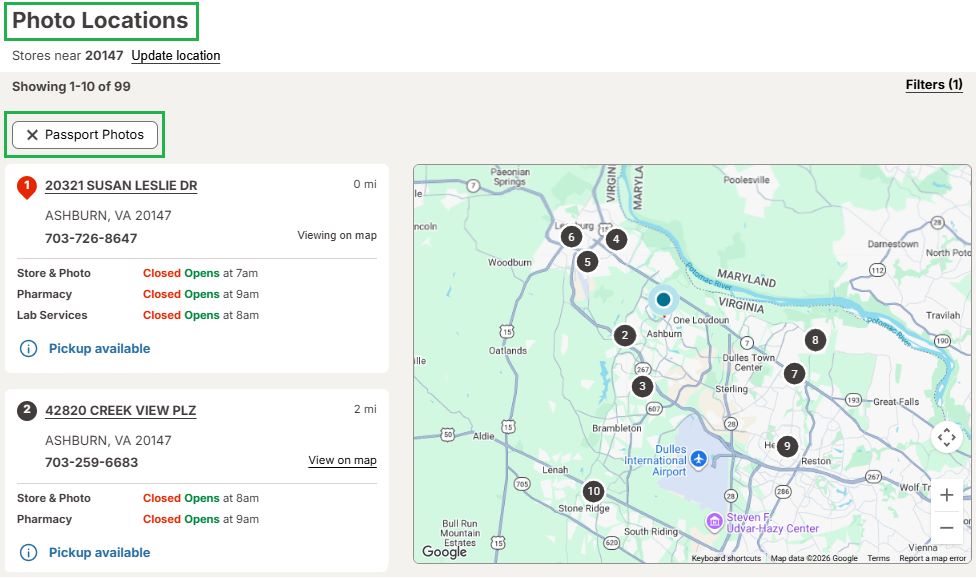
Use Walgreens store finder to find branches with passport photo services – Filter by ‘Passport Photo’. - SOURCES
- https://travel.state.gov/content/travel/en/passports/how-apply/photos.html
- https://travel.state.gov/content/travel/en/passports/how-apply/online-renewal-photo.html
- https://photo.walgreens.com/store/passport-photos
- https://www.walgreens.com/topic/information/passport-policy.jsp
- https://www.walgreens.com/storelocator/find.jsp?passport-photos
Use this guide to find a Walgreens store with passport photo service, learn how much it costs, and how to get a compliant passport photo online. Data verified against official U.S. Department of State guidelines and Walgreens retail pricing as of 2026.
Written by: PhotoBooth Online Editorial Team
Updated: 6/19/2026
How to Capture a Photo for Upload
Wear contrasting clothing
Avoid strong overhead lighting
Keep hair away from the face
Maintain a neutral expression
How does it work online?
- STEP 1Upload/Take a photo
- STEP 2Get results emailed or delivered


Why People Choose PhotoBooth Online?
Guaranteed Compliance & Acceptance
Your passport photos are processed in strict accordance with U.S. Department of State requirements. A two-step verification (AI + human expert) ensures your photo is 100% compliant, so you can submit your documents with total confidence.Privacy & Data Protection
Your personal data and photos stay private and secure. All information is protected by modern encryption standards, used exclusively to fulfill your order.Simple & Trackable Process
You can track your order status every step of the way—from the initial upload to final delivery or pickup—keeping you fully informed and in control.Professional-Grade Results
You'll receice government-ready photos. Every order is printed on premium-quality paper with precise dimensions and accurate color reproduction to meet the highest official standards.
Frequently Asked Questions
What do I need to bring to get my passport photo taken at Walgreens?
You don’t need specific documents. Walgreens stores only provide the passport photos; they do not process applications.
What are the key requirements for a U.S. passport photo?
The main requirements include:
- Size: 2×2 inches
- Background: Plain white or off-white
- Expression: Neutral facial expression (no smiling) with your mouth closed. A slight, natural smile may be acceptable, but a neutral expression is preferred.
- Eyes: Both eyes must be open and visible.
- Clothing: Wear normal, everyday attire that contrasts with the background. Avoid uniforms, clothing that resembles a uniform, or camouflage patterns.
- Head Coverings: No hats or head coverings are allowed unless worn daily for religious purposes. If worn for religious reasons, your full face must be visible.
- Glasses: Eyeglasses are not allowed in passport photos.
Always refer to the official U.S. Department of State website for the most detailed and up-to-date requirements.How to check if a Walgreens passport photo meets US requirements?
# Feature Requirement for Compliance 1 Appearance No glasses, headphones, or large jewelry. Maintain a neutral expression with your mouth closed. 2 Lighting Face and background must be plain white and free of shadows. 3 Dimensions Head must measure between 1 and 1 3/8 inches within the official 2×2″ frame. 4 Digital File Check your email for a sharp, 600×600 px file before the associate closes the order in the system. 5 Print Quality Ensure there are no ink streaks, spots, or uneven “crooked” trimmed edges on the physical prints. Can I submit my Passport application at the store?
No, Walgreens doesn’t process applications. You have to submit the actual application at the post office or a local clerk’s office.
Does Walgreens have passport application forms available?
Some Walgreens stores may have passport application forms available, but it’s best to download them directly from the official U.S. Department of State website to ensure you have the most current version.