

Walgreens Passport Photo: Prices, Locations & Comparison


- 3-Minute
- Expert
- 800K+
- Passport Photos
- Verification
- Photos Approved
Walgreens Passport Photo: In-Store ($16.99) vs Online Option ($2.95)
Does Walgreens do passport photos in 2026?
Yes, Walgreens still does passport photos — but only in store. At most Walgreens locations you’ll get two printed 2×2 inch government-compliant photos for $16.99, and an emailed digital copy is optional included at no extra charge. No appointment is needed.
At the store, a trained photo associate takes the photo. Prints are checked for size, background, head position, and placement, and they’re typically ready in 15-30 minutes. If you want a digital file on USB, that option is available for an additional fee.
Walgreens takes passport and visa photos for all ages, including infants and children, and can also shoot sizes for many international countries — confirm what’s available at your local store.
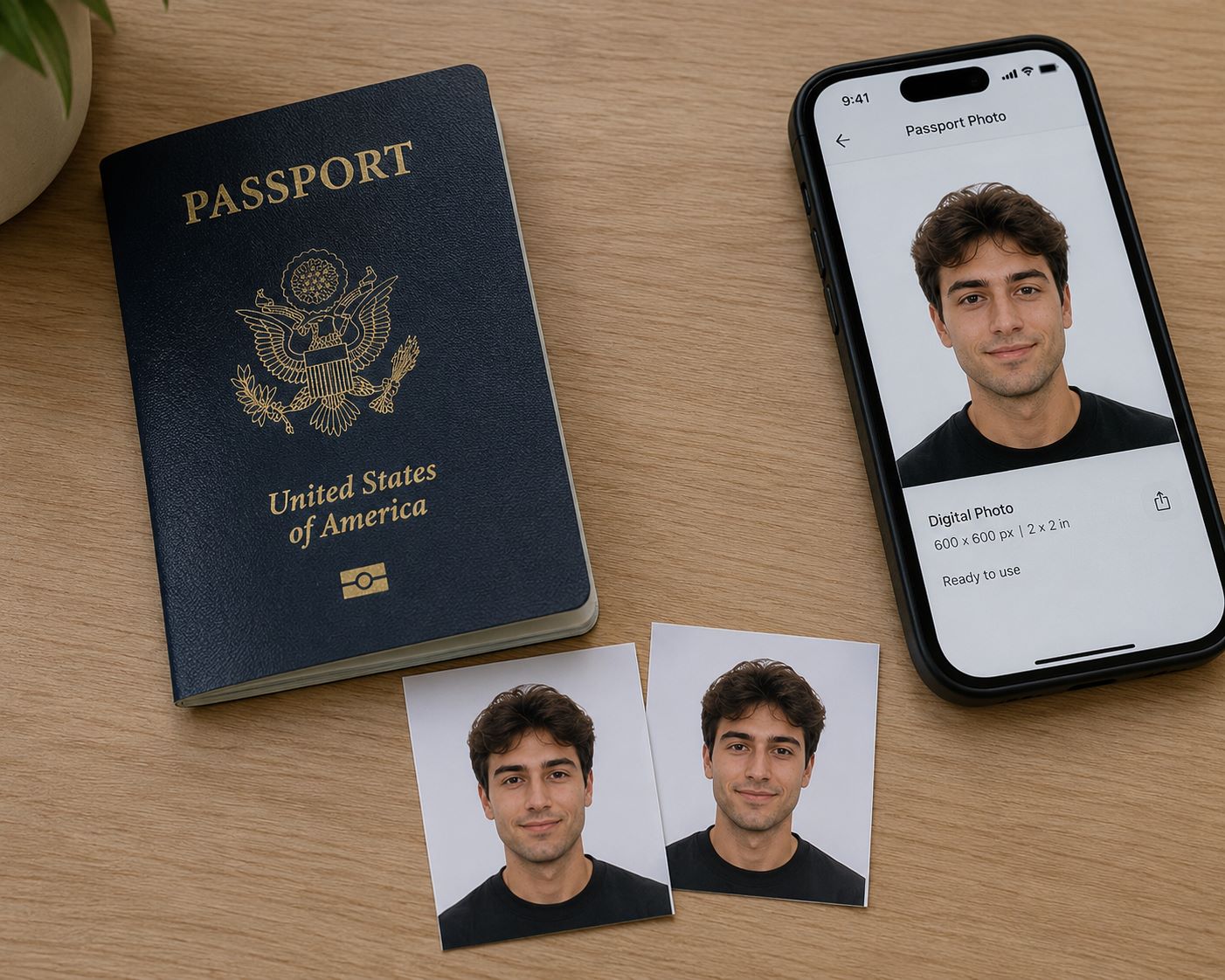
Example of a Walgreens passport photo set — two 2×2 inch photos and a digital copy. How much does a Walgreens passport photo cost?
You’ll pay $16.99 for two 2×2 inch Walgreens passport photos. You get them in store at most locations — no appointment needed — and that price covers the printed set plus an optional free digital copy by email.
If you’d rather have the file on a USB, that option is available for an additional fee. Check the USB price at your store.
Does Walgreens do digital passport photos?
Yes, Walgreens includes a free emailed digital copy with its in-store passport photo service. For $16.99 you get two 2×2 inch prints plus the option to receive the digital file by email at no extra charge. A USB copy is available for an additional fee. That differs from chains like CVS, where prints run about $17.99 and an emailed digital copy adds $3.99 more (about $21.98 total for both).
The file is the same in-store capture used for the prints. For online renewal, upload that original — not a scan of the print — and confirm it meets State Department rules (accepted file type, 54 KB–10 MB, no edits). Crop only inside the official application.
Passport photos at Walgreens are walk-in and in-store only — you cannot order them online for pickup. Confirm your store has a photo associate on shift, provide your email carefully at checkout, and open the file before you leave so staff can help if it never arrives (check spam first).
If you only need a digital file and prefer to skip the store visit, you can also prepare it online with PhotoBooth Online for $2.95. You receive a digital passport photo, guaranteed to meet official requirements, and ready in minutes. Upload your photo to get started; we prepare your passport photo from it and check size, background, head size and position, facial expression, and other official requirements.
How much does a digital copy cost at other stores?
Walgreens (in-store)
Free (only with prints)
CVS (in-store)
$3.99 (only with prints)
The UPS Store (in-store)
Not offered
USPS (in-store)
Not offered
PhotoBooth Online
$2.95
Walmart (in-store)
(only with prints)
Rite Aid
Discontinued
Costco
Discontinued
Does Walgreens print passport photos?
Yes, you can print passport photos at Walgreens in two ways: the in-store passport photo service, or a DIY 4×6 print if you already have a prepared file. Full-service usually means $16.99 for two 2×2 inch prints (plus a free emailed digital copy). The DIY route is typically cheaper — you print a standard 4×6 sheet and cut out the 2×2 photos yourself. Confirm photo services at your location before you go.
Choose full-service if you want a trained associate to take the passport photo under controlled lighting. Choose the 4×6 DIY route if you already have a usable photo and mainly need low-cost prints. Either way, Walgreens does not decide whether the photo is accepted — the final 2×2 print must meet State Department rules (exact size, plain background, correct head size, no shadows).
How to print passport photos at Walgreens?
For the DIY route, start with a compliant 2×2 photo on a 4×6 print-ready sheet. Then pick one print path:
1Order online. Upload the 4×6 file to Walgreens Photo. Select a standard 4×6 photo print — not an enlargement, collage, or cropped layout. Choose no borders / no automatic crop if available. Preview the order, then pick it up in store and cut out the 2×2 photo carefully.
2Print at an in-store kiosk. Bring the same 4×6 file on your phone or USB. At the kiosk, select a standard 4×6 print and turn off crop, fit-to-frame, borders, or any layout that changes the sheet. Check the preview before you pay — if the kiosk resizes the file, cancel that option. Cut out the 2×2 photo after pickup.
If you still need a file for Walgreens, we can prepare a print-ready 4×6 template for $2.95. If you prefer to skip store printing, we can print and ship a set of six U.S. passport photos for $9.95. Upload your photo; we check size, background, head size and position, facial expression, and other official requirements, then deliver the file or the prints.
How much does a set of two passport photos cost at other stores?
Walgreens (in-store)
$16.99
CVS (in-store)
$17.99
The UPS Store (in-store)
$11.99
USPS (in-store)
$15
PhotoBooth Online
$9.95
Walmart (in-store)
$7.64
Rite Aid
Discontinued
Costco
Discontinued
How can I find a Walgreens store with passport photo service near me?
1Open Walgreens Photo Locator — the Passport Photos filter is already on.
2Click Update location and enter your ZIP or city, or allow location access.
3Pick the closest store from the list. Each listing shows distance, address, and phone.
4Check Store & Photo hours on that store before you go.
5Go to the Photo Center and ask for a passport photo. No appointment needed.
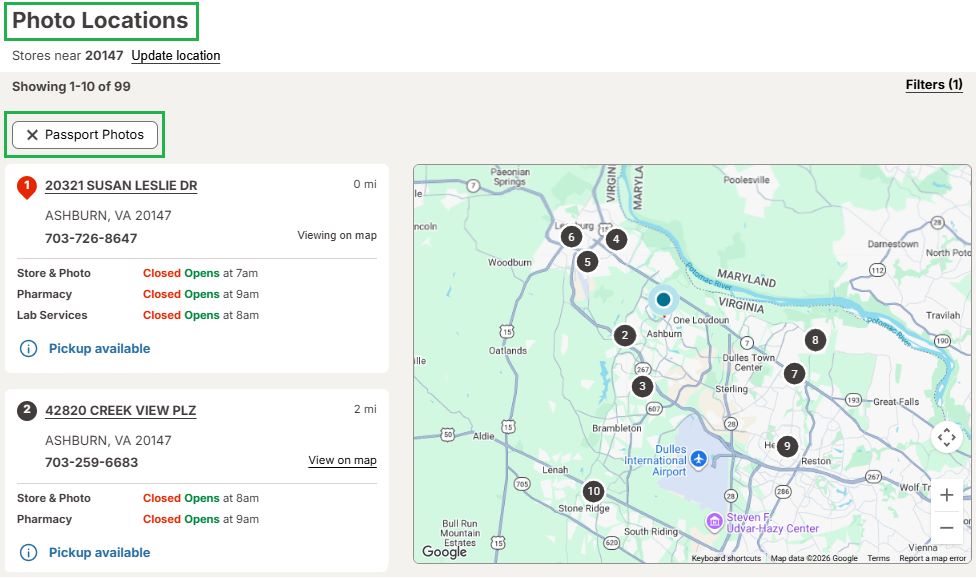
Use Walgreens store finder to find branches with passport photo services near you What size is a Walgreens passport photo?
Walgreens offers 2×2 in (51×51 mm) passport photos, the official U.S. standard size. Photos meet U.S. passport requirements, including a white background and a 1.29 in head size.

Walgreens passport photo How to get passport photos for $2.95
Upload a photo or take one on your phone/ camera — PhotoBooth Online turns it into a U.S. passport photo that meets State Department requirements, usually in about three minutes. For $2.95 you get a high-resolution digital file plus a printable 4×6 template with six 2×2 inch photos, sent to your email.
That same 4×6 template can be printed at Walgreens Photo for about $0.39 per sheet, then cut into individual 2×2 prints — often the lowest-cost way to get physical copies if you already have a compliant file.
If you want prints without a store stop, choose Prints + Digital for $9.95: the same digital set plus six printed passport photos, shipped in 2–3 business days.
Every photo is reviewed with passport photo system and a human expert. If the passport office rejects your photo, PhotoBooth Online offers a 100% refund.
Use this guide to find a Walgreens store with passport photo service, learn how much it costs, and how to get a compliant passport photo online. Data verified against official U.S. Department of State guidelines and Walgreens retail pricing as of 2026.
Written by: PhotoBooth Online Editorial Team
Sources:
https://travel.state.gov/content/travel/en/passports/how-apply/photos.html
https://travel.state.gov/content/travel/en/passports/how-apply/online-renewal-photo.html
https://photo.walgreens.com/store/passport-photos
https://www.walgreens.com/topic/information/passport-policy.jsp
https://www.walgreens.com/storelocator/find.jsp?passport-photosUpdated: 10/13/2026
How to Capture a Photo for Upload
Wear contrasting clothing
Avoid strong overhead lighting
Keep hair away from the face
Maintain a neutral expression
How does it work online?
- STEP 1Upload/Take a photo
- STEP 2Get results emailed or delivered


Why People Choose PhotoBooth Online?
Guaranteed Compliance & Acceptance
Your passport photos are processed in strict accordance with U.S. Department of State requirements. A two-step verification (AI + human expert) ensures your photo is 100% compliant, so you can submit your documents with total confidence.Privacy & Data Protection
Your personal data and photos stay private and secure. All information is protected by modern encryption standards, used exclusively to fulfill your order.Simple & Trackable Process
You can track your order status every step of the way—from the initial upload to final delivery or pickup—keeping you fully informed and in control.Professional-Grade Results
You'll receice government-ready photos. Every order is printed on premium-quality paper with precise dimensions and accurate color reproduction to meet the highest official standards.
Frequently Asked Questions
Does Walgreens do passport photos in 2026?
Yes, Walgreens takes passport photos. A set of two 2×2″ photos costs $16.99. A digital copy is included and sent via email. If you need it on a USB drive, there is an additional fee.Do I need an appointment? What are Walgreens operating hours?
No appointment is required—simply visit the Photo Center during business hours (typically 9:00 AM – 9:00 PM) and ask an employee to take your passport photo.
Note: Some Walgreens locations are open 24 hours, although passport photo services may have limited overnight availability depending on staffing.
Does Walgreens take international and visa photos?
You can also get international passport photos at Walgreens, such as 35×45 mm photos for EU and UK passports, as well as many other countries. Availability may vary by location, so it’s best to call ahead to confirm as well as bring your country’s specific requirements.Does Walgreens take baby and children passport photos?
Yes, Walgreens offers passport photos for everyone, from newborns to adults. Since services can vary by location, it’s a good idea to call your local store before visiting. The staff can let you know if they recommend bringing anything to help with the photo, such as a white blanket or a car seat for your baby.What do I need to bring to get my passport photo taken at Walgreens?
You don’t need specific documents. Walgreens stores only provide the passport photos; they do not process applications.What are the key requirements for a U.S. passport photo?
The main requirements include:
- Size: 2×2 inches
- Background: Plain white or off-white
- Expression: Neutral facial expression (no smiling) with your mouth closed. A slight, natural smile may be acceptable, but a neutral expression is preferred.
- Eyes: Both eyes must be open and visible.
- Clothing: Wear normal, everyday attire that contrasts with the background. Avoid uniforms, clothing that resembles a uniform, or camouflage patterns.
- Head Coverings: No hats or head coverings are allowed unless worn daily for religious purposes. If worn for religious reasons, your full face must be visible.
- Glasses: Eyeglasses are not allowed in passport photos.
Always refer to the official U.S. Department of State website for the most detailed and up-to-date requirements.
How to check if a Walgreens passport photo meets US requirements?
# Feature Requirement for Compliance 1 Appearance No glasses, headphones, or large jewelry. Maintain a neutral expression with your mouth closed. 2 Lighting Face and background must be plain white and free of shadows. 3 Dimensions Head must measure between 1 and 1 3/8 inches within the official 2×2″ frame. 4 Digital File Check your email for a sharp, 600×600 px file before the associate closes the order in the system. 5 Print Quality Ensure there are no ink streaks, spots, or uneven “crooked” trimmed edges on the physical prints. Can I submit my Passport application at the store?
No, Walgreens doesn’t process applications. You have to submit the actual application at the post office or a local clerk’s office.Does Walgreens have passport application forms available?
Some Walgreens stores may have passport application forms available, but it’s best to download them directly from the official U.S. Department of State website to ensure you have the most current version.