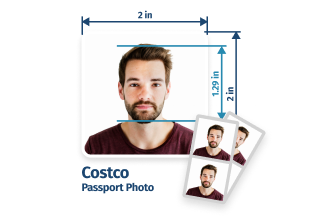
Costco Passport Photo Services

What’s Included & Delivery


Costco Passport Photo Services—Options, Cost, Tips
- Service Details
Does Costco Do Passport Photos in 2026?
Costco no longer offers in-store passport photo services. However, there’s a smart workaround for cheap printing: both members and non-members can upload to the Costco Photo a pre-made 4×6 template containing compliant 2×2” passport photos—created using an online service like photobooth.online—and print it at Costco’s photo partner Shutterfly for just $0.28.
To create your 4×6 template simply upload your photo, and PhotoBooth Online will convert it into a professional-grade passport photo in under 3 minutes. You’ll receive a digital photo and a 4×6″ (10×15 cm) printable template featuring six individual passport photos immediately. This layout is perfectly formatted for the Costco Photo system. Prefer a hands-off approach? You can also order premium prints directly through our service, with free shipping and delivery within 1–5 business days.
Keep reading to learn more about the process and how to get started. - PhotoBooth Online
Get compliant passport photo with PhotoBooth Online:
- Capture a photo on your phone and upload it. No special equipment or lighting is required.
- We use smart technology to instantly analyze your photo for official requirements, such as head size, eye position, facial expression, and more.
- Our system replaces background with the required plain white/ off-white color.
- The service includes a final check by a human expert to ensure your passport photo is 100% compliant.
- Download digital files or get prints shipped to your home.
Pricing:
- Digital Template ($2.95): A high-resolution digital photo for online applications plus a professional 4×6 print-ready template.
- Physical Prints ($9.95): Six high-quality prints for physical submission delivered to your door (shipping included).
- Printing
How to print a 4x6 passport photo template by Costco Photo?
- Prepare your 4×6 passport photo template with PhotoBooth Online Passport Photo Maker.
- Go to the Costco Photo and upload your saved template as a standard 4×6 print.
- Complete your order by selecting your preferred delivery method.
- Pricing
How much does a Costco passport photo cost?
Printing a 4×6 sheet (which holds 6 passport photos) at Costco Photo (Shutterfly) costs just $0.28 (plus shipping).
Please note that Costco no longer handles printing directly; all photo services are now fulfilled through their partner, Shutterfly.
Shutterfly Shipping fees:
- Economy ($1.79 – $2.49): 6–10 business days. Best for non-urgent orders; tracking is limited or unavailable.
- Standard ($4.49 – $5.99): 5–7 business days. Includes full door-to-door tracking.
- Free Shipping: Available on all orders over $49 for linked Costco accounts.
- Photo to Upload
How to take a photo to upload to PhotoBooth Online?
To get started, simply take a photo using your smartphone following these tips for a guaranteed result:
- Before taking the shot, turn off all beauty modes, social media filters, and AI enhancements on your phone. The passport photo must represent your natural skin tone and features without any digital retouching.
- Capture your head, neck, and shoulders. Leave plenty of space above your head and around your shoulders.
- Look directly at the camera with your eyes open and clearly visible.
- Maintain a neutral facial expression with your mouth closed (avoid smiling).
- Even if you wear glasses every day, you must remove them for the passport photo.
We’ll handle the rest. Once you upload your raw photo, it’ll automatically remove the background, fix the lighting, and crop the image to the exact 2×2 inch government standard. - Sources
- https://travel.state.gov/content/travel/en/passports/how-apply/photos.html
- https://www.costco.com/photo.html
- https://support.shutterfly.com/s/article/costco-partnership
We update this page whenever the State Department changes its guidelines or Costco/Shutterfly update their services. A passport photo expert reviews every update for accuracy.
Written by: PhotoBooth Online Editorial Team
Updated: 05/04/2026
6 Steps to Capture a Compliant Passport Photo

- Place your smartphone 1.5-2 feet away at eye level
- Disable all filters (filters aren't allowed)
- Use any background. We'll replace it to meets the rules

- Stand up straight, open eyes, no smile, no glasses
- Include an area like the example in the frame
- Take or upload a photo here. We'll guide you
How to Get Your Passport Photos on a 4x6 Sheet for Costco
1. Take a photo at home
Stand against a wall with even lighting. Your shoulders and upper torso should be visible in the frame. Keep a neutral expression. (Don't worry about the background, our system will ensure it's white and shadow-free.)2. Upload the image
The system automatically checks and adjusts background, head size, proportions, resolution, and framing to meet U.S. Department of State passport requirements. After this automatic processing, your photo is double-checked by a human expert to guarantee full compliance.


3. Download the 4×6 print sheet
It includes six 2×2 passport photos on a 4×6 sheet. This is formatted specifically for Costco / Walgreens / CVS / Walmart photo labs.4. Order your passport photos
Select a 4×6 print, upload the 4×6 sheet, and place an order. Get it shipped to your home. You now have several compliant 2×2 passport photos.


Your Passport Photo is Safe: Privacy & Guarantee

Reliable Data Protection

Passport Photos Are Deleted

Instant Feedback

Guaranteed Acceptance or Money Back
Frequently Asked Questions
Does Costco do digital passport photos?
Since closing its in-store photo centers in 2021, Costco does not offer digital passport photo services. Instead, members must use third-party apps to create their own passport-compliant photos.
Does Costco offer in-store printing for pre-prepared passport photos?
Costco does not offer in-store photo printing at any of its warehouse locations.
How do I link my Costco membership to Shutterfly?
- Go to the Costco Photo Homepage.
- Enter your Costco Membership Number and click “Add My Membership.”
- Sign in to your Shutterfly account (or create a new one). Note: One membership can be linked to up to 3 Shutterfly accounts.
What are the exclusive benefits for Costco members on Shutterfly?
By linking your Costco membership to your Shutterfly account, you unlock:
- 51% OFF all regular-priced orders.
- FREE Economy Shipping on orders over $49.
- Best price guarantee: Shutterfly automatically applies the highest available discount to your cart.
Is there a way to get prints for free?
Yes, if you use the Shutterfly Mobile App, you can get unlimited free 4×6 prints (up to 250 per order).
Pro Tip: While the prints are free via the app, you will still need to pay for shipping. Compare the “Free App Prints + Shipping” cost vs. the “51% Member Discount + Shipping” to see which is cheaper for your specific order.
What size are U.S. passport photos?
The size of U.S. passport photo is 2×2 inches, with the head height measuring 1–1.4 inches.
Why did Costco stop taking passport photos?
The main reason for the closure was a sharp decline in demand for printed services due to the proliferation of smartphones and social media, which made the in-store photo centers unprofitable for Costco’s business model.