

Kmart Passport Photos: Create Yours in 2 Min
• We ensure 100% compliance
• Get approved prints + a digital copy
- 112,738
- 99.83%
- Images Done
- Accepted by Govt.
How to Get Kmart Passport Pictures
- QUICK STEP-BY-STEP GUIDE
Getting a Print-Ready Passport Photo for Kmart
- 1
Upload a usual photo
Take a simple full-face photo with your phone – no need for a professional background. Upload your image here to prepare your Kmart passport photo.
- 2
Let us prepare your picture
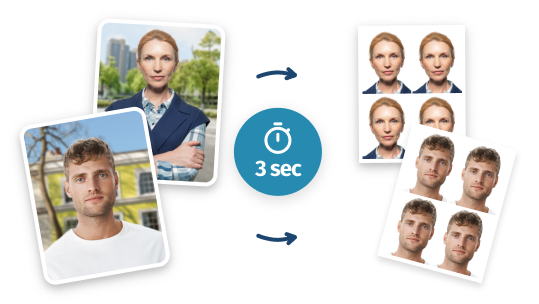
We’ll instantly adjust your photo to meet Australian passport standards: correct size (35×45 mm), background, and proportions.
- 3
Preview your passport photo
See a preview of your new passport photo. You can retake it for free until you’re fully satisfied.
- 4
Save template and order prints
Download your print-ready 4×6″ passport photo layout with multiple copies – and print it for just $0.10 at Kmart’s Kodak kiosk (see printing details here). Or you can order home delivery of ready-made prints.
Printing Your Passport Photo at a Kmart Store
Save your 4×6″ print-ready passport photo template on your phone, then print it at Kmart using a Kodak Moments self-service kiosk.
- 1
Find a Kmart with a Kodak Moments kiosk
Use the store locator to confirm the location has a Kodak photo booth.
- 2
Select the Correct Size
On the screen, select Prints → Prints and Enlargements → 6×4″.
- 3
Choose Preferred Service Speed
Choose either Instant (it costs $0.20), One Hour ($0.15), or Next Day ($0.10).
- 4
Upload Your Template to the Kiosk
Choose Mobile Device → Use Direct Transfer and scan the on-screen QR code to transfer your passport photo template to the kiosk.
- 5
Finalize Your Order and Print
Tap Checkout, choose Glossy finish, then tap Continue → Place Order. Pay at the kiosk or counter, scan your receipt, and your passport photo will print immediately.
A step-by-step guide on how to prepare and print your passport photo at Kmart.
Written by: PhotoBooth Online Team
Updated: 15/04/26
- 1
Why Print Passport Photos at Kmart with PhotoBooth Online
Get Guaranteed Acceptance
Get Print-Ready in Moments
Get a Ready-Made Template Now
- STEP 1Upload a photo to process
- STEP 2Save your printable image


Passport Photo at Kmart: Options in 2026
Kmart Photo Prices
You can get Kmart passport photos today—prepare a verified digital picture and have your passport pictures printed at any Kmart store. As an alternative, you can order printouts online for the same price (with a free pick-up) on the official Kmart website. For printing instructions, see the FAQ below.In-Store Passport Pictures
Kmart stores do not offer the option to have your passport photo taken. However, there are kiosks where you can print pictures taken elsewhere. For example, prepare them here: upload a usual full-face photo to convert it into a Kmart-ready printable template (or print it in any other store; for example, it's suitable for Harvey Norman passport photos).Photo Kiosk Locations
To print your pictures, you will need to use the dedicated Kodak Moments photo kiosk located at almost any Kmart photo center. Use the store locator to find where you can print your image. Alternatively, you can order passport picture prints in the online service or via the Kmart app.Home Delivery
You can have your printouts shipped right to your home—as soon as your biometric pictures are prepared, expert-verified and printed out, enter your home address and order shipping. Your printed Kmart passport photos will be delivered to you within the next 4–10 working days.Picture Quality Assurance
Kmart photo kiosks do not have any in-built photo verification systems. To make sure that the picture you're printing meets the requirements, prepare it in this online service: a certified expert will thoroughly check your Kmart passport photo against the Australian government rules.Kmart Opening Hours
On average, Kmart locations open up at 7-8 AM and close at 9 PM. Please note that these hours can be shorter on weekends and bank holidays: in case you need a Kmart passport photo on a day off, you can prepare printed and digital pictures in the online service anytime it's convenient to you.
Kmart Passport Photos: Frequent Questions
Does Kmart do passport photos?
No, Kmart stores in Australia do not take passport photos.
Does Kmart print passport photos?
Yes, Kmart stores in Australia let you print passport photos.
Most Kmart locations have self-service photo kiosks where you can print a compliant passport photo prepared elsewhere. Alternatively, you can order prints online and pick them up in-store later.
Use our service to prepare a print-ready passport photo, then see in-store printing instructions or how to print via Kmart’s website.
This option is fast, low-cost, and fully meets Australian passport photo standards.
How do I print passport photos using Kmart's online service?
You can order a passport photo print online and collect it in-store the next day.
Start by creating a 4×6″ print-ready passport photo template here and saving it on your device.
Steps to print via Kmart’s website:
- Go to the printing site: Visit the Kmart online printing page.
- Select store: Enter your suburb or postcode to choose your pickup location.
- Choose print format: Select “4×6″ (10×15cm)” and “Glossy” finish. Click “Order Prints”.
- Sign in or create an account: If you don’t have one already, you’ll be prompted to register.
- Upload your photo: Click “Upload Photos”, go to the “Computer” tab and select “Slower Upload – Full Resolution” for best quality.
- Do not edit the image: On the “Review & Edit” page, skip editing and click “Add to Bag”.
- Check your order: Make sure there’s only one print in the cart (one template contains multiple photo copies).
- Select “Click & Collect”: This free pickup option means your photo will be ready the next day.
- Enter contact details: Add your billing address, name and phone number.
- Make payment: Complete checkout using PayPal or a credit card.
- Pick up your print: You’ll receive a notification (to your phone and email) when the photo is ready at your chosen store.
How much do Kmart passport photos cost?
Here’s how much you’ll pay depending on how and where you print your passport photo:
Print Method Service Level Price In-store kiosk Instant print $0.20 In-store kiosk One-hour service $0.15 In-store kiosk Next-day pickup $0.10 Online printing Next-day pickup $0.10 All options require a 4×6″ passport photo template. You can create it here and print it at any Kmart store.
Why use PhotoBooth Online when Kmart has its own photo app?
The Kmart Photos app only lets you upload and print a photo — it does not verify compliance with official passport rules. There’s no background removal, sizing adjustment, or quality check.
In contrast, PhotoBooth Online helps you:
- Create a passport photo from scratch (or upload an existing one)
- Automatically meet Australian government size and background requirements
- Get expert human review for 100% acceptance
Once ready, you get a printable 4×6″ photo sheet — compatible with all Kmart kiosks and online printing options.
Will the passport office accept photos made in PhotoBooth Online and printed at Kmart?
Yes — passport photos created with PhotoBooth Online and printed at Kmart are accepted by the Australian Passport Office.
Our system applies all official requirements automatically, including:
- Correct photo size (35×45 mm)
- Plain, light background
- Proper lighting and contrast
- Face position and proportions aligned to ICAO and Australian guidelines
Each photo is then manually reviewed by a trained expert before being delivered — so you get a 100% compliant image, ready to print at Kmart.
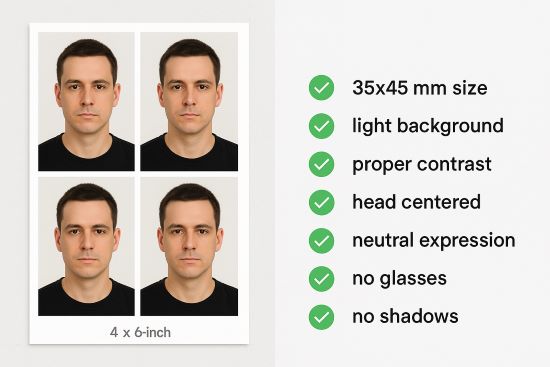
How your printed photo will look like